For app developers & publishers · iPhone

Your ad revenue at a glance.

EarnHub brings your AdMob, AdSense, App Store and Google Play earnings into one clean iPhone dashboard — daily, monthly, and every trend in between.

Coming soon to theApp Store See features →

Free with ads · iOS 17 or later · English & 繁體中文

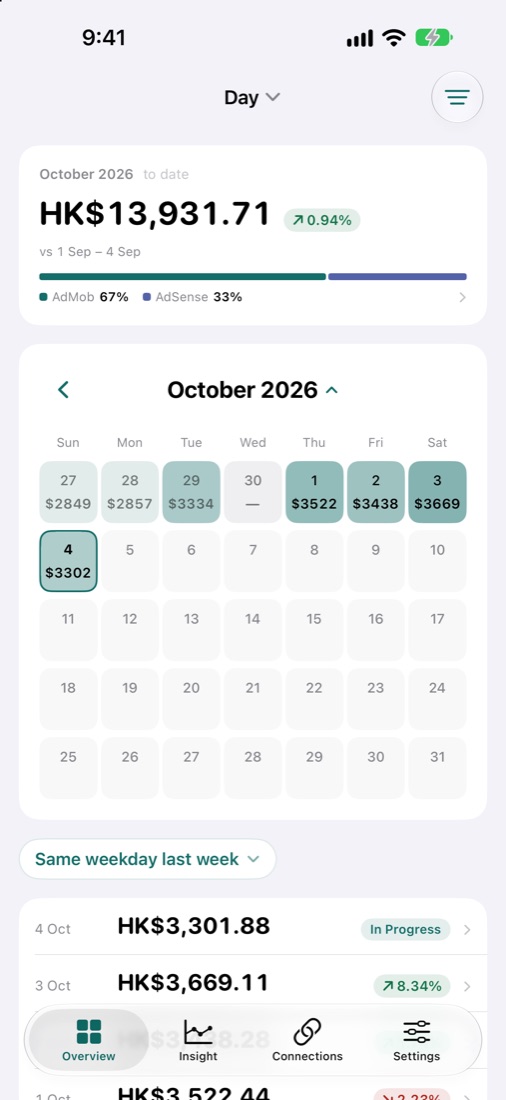
EarnHub revenue calendar showing daily earnings for October

One dashboard for every revenue source

  • Google AdMob
  • Google AdSense
  • App Store Connect
  • Google Play

Stop jumping between consoles

Check yesterday's earnings in seconds, spot what changed, and see the whole month on one calendar.

Overview

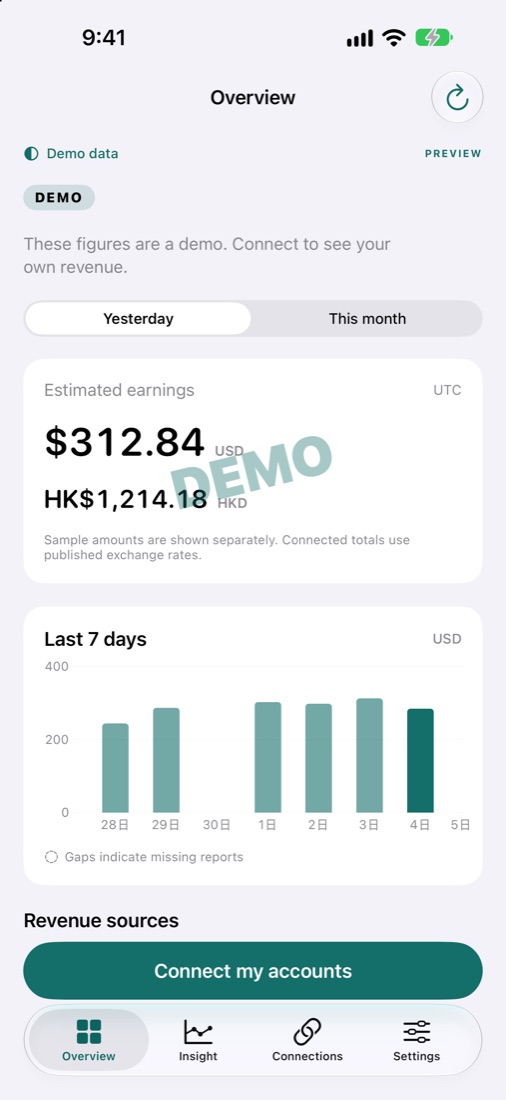
Yesterday and month-to-date estimated earnings, plus the last 7 days at a glance.

Insights

Revenue, eCPM and impressions compared with the previous period, with the biggest changes called out.

Revenue calendar

Browse earnings by day, week, month or year, and compare with the same weekday last week.

Multi-currency

Amounts keep their original currency and can be converted with published exchange rates.

Honest numbers

Days a platform hasn't reported yet are marked clearly — never silently counted as zero.

All sources together

Ad revenue and in-app purchase proceeds side by side, with each source's share of the month.

Insights

Know why your revenue moved

EarnHub compares this period with the one before and tells you what actually changed — not just that the number is different.

  • Revenue, eCPM and impressions, this week vs. last week
  • Strongest weekday and top-earning apps highlighted
  • Flags when a source is still behind on reporting
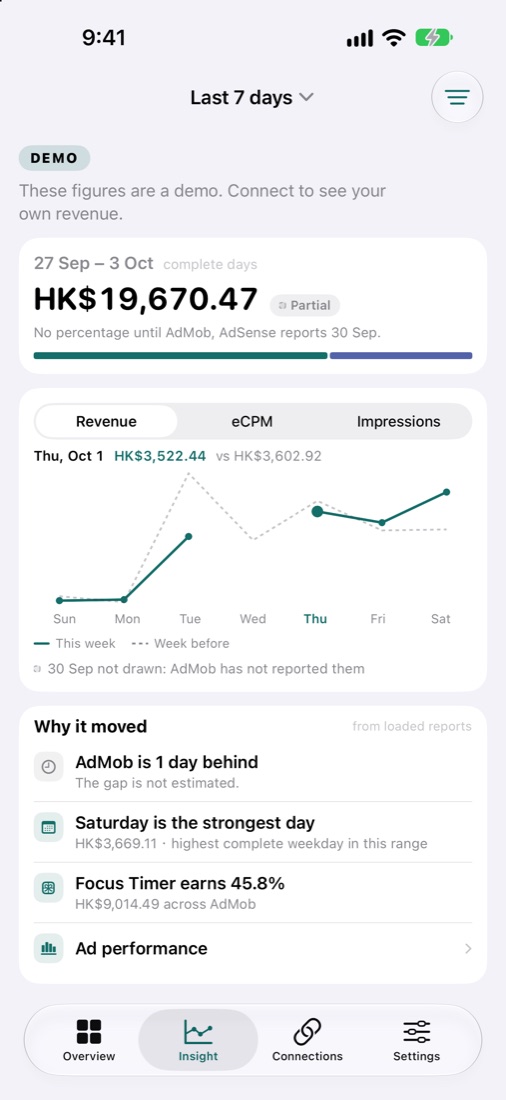
EarnHub Insights screen comparing revenue this week with the week before
Overview

Yesterday's earnings, first thing in the morning

Open the app and see yesterday and this month at once, with a 7-day chart that shows gaps instead of hiding them.

  • Estimated earnings in each report currency
  • Last 7 days chart with missing reports marked
  • Pull to refresh whenever you like
EarnHub Overview screen with yesterday's estimated earnings and a 7-day chart (demo data)
Connections

Connect in a minute, read-only

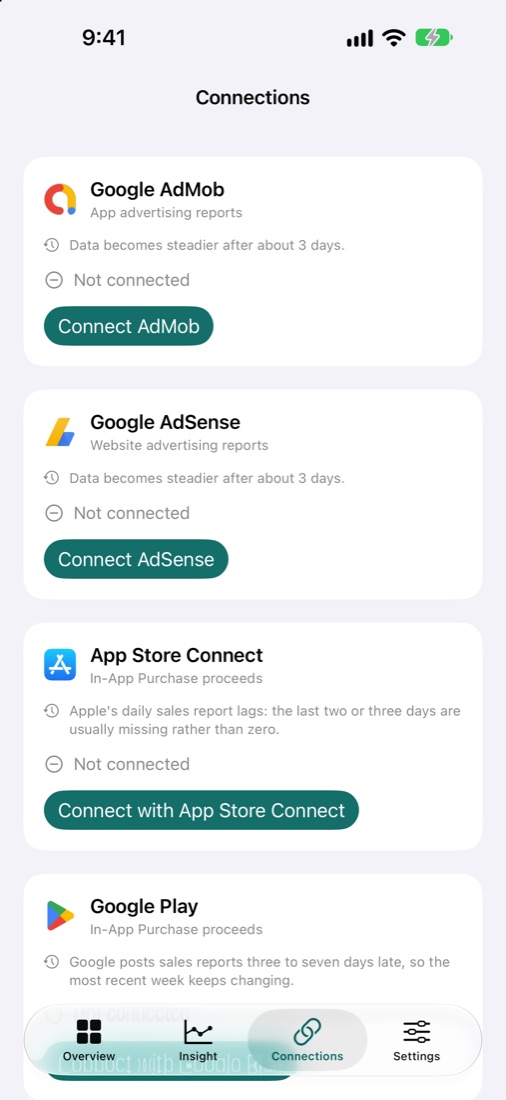
AdMob and AdSense use Google's standard authorization with read-only report access. App Store Connect and Google Play use your own read-only credentials.

  • No separate EarnHub account to register
  • Try the demo data before connecting anything
  • Disconnect any source at any time
EarnHub Connections screen listing Google AdMob, Google AdSense, App Store Connect and Google Play
Home Screen widget · Pro

Your earnings, right on your Home Screen

Add the EarnHub widget and see your revenue without opening the app. Choose the period and whether it runs to yesterday or today.

  • Small: total earnings and change at a glance
  • Medium: adds each source's amount and share, largest first
  • Period: same as Overview, 1, 7 or 30 days
  • Missing days and sources not yet loaded are marked, never counted

How it works

From install to your first report in three steps.

Explore the demo

Open EarnHub and look around with clearly labelled sample data — no account needed.

Authorize Google once

Grant read-only access to your AdMob or AdSense reports. Add App Store Connect or Google Play if you sell in-app purchases.

Check in daily

Your earnings, trends and calendar update from each platform's own reports.

Built read-only, privacy first

Your revenue data is yours. EarnHub is designed to look, not touch.

Read-only access

EarnHub can't change your ad units, settings or payouts.

Kept on your iPhone

AdMob and AdSense figures are read and cached on your device.

No tracking

The app doesn't track you across other apps and websites.

Simple pricing

Free with ads. Upgrade to Pro for no ads and the Home Screen widget.

Free

$0

Every in-app feature, with a small banner ad.

  • All revenue sources
  • Overview, Insights & Calendar
  • Multi-currency

Pro

Optional monthly subscription

No ads, plus EarnHub on your Home Screen.

  • Everything in Free
  • No banner ads
  • Home Screen widget (small & medium)
  • Cancel anytime in your Apple account

Frequently asked questions

Which revenue sources does EarnHub support?

Google AdMob, Google AdSense, App Store Connect (in-app purchase proceeds) and Google Play.

Do I need to create an account?

No. You authorize Google once with read-only report access. There is no separate member sign-up.

Can EarnHub change my ads or payments?

No. EarnHub requests read-only reporting access. It cannot change ad units, settings or payouts.

Are the figures my final payout?

No. They are estimated earnings from each platform's reports and are not settled payments. Recent days may still change as platforms finalise their reports.

Why are some days missing?

Platforms report with a delay — Apple's daily sales reports and Google Play's can lag by a few days. EarnHub marks those days as missing instead of showing zero.

Is EarnHub free?

Yes. EarnHub is free with ads. An optional monthly Pro subscription removes ads and adds the Home Screen widget.

Which devices are supported?

iPhone with iOS 17 or later.

See all your revenue in one place.

EarnHub for iPhone is coming soon to the App Store.

Coming soon to theApp Store